
Overview
Elements Application
The Elements Application is a web-based platform that provides an intuitive interface for geospatial analysis using satellite imagery, device location data, and other sensor data.
What You Can Do
With the Elements Application, you can:
- Access a library of predefined analyses with multiple sensor data types ranging from phones, cars, ships, and planes
- Run multiple analyses in the same project without having to create duplicate projects
- Compare multiple time series across AOIs and Analyses and visualize map results for certain selections of AOIs and analyses
- Edit projects - add AOI/s, add analysis/es and extend time range
- Create Projects - Define your analysis by selecting areas of interest, analyses, and time ranges
- Run Multiple Analyses - Execute multiple analyses in the same project without duplicating work
- Visualize Results - View results on interactive maps and compare across AOIs and time periods
- Edit Projects - Add AOIs, analyses, or extend time ranges to existing projects
- Manage Data - Access a library of pre-built analyses with multiple sensor data types
Workflow
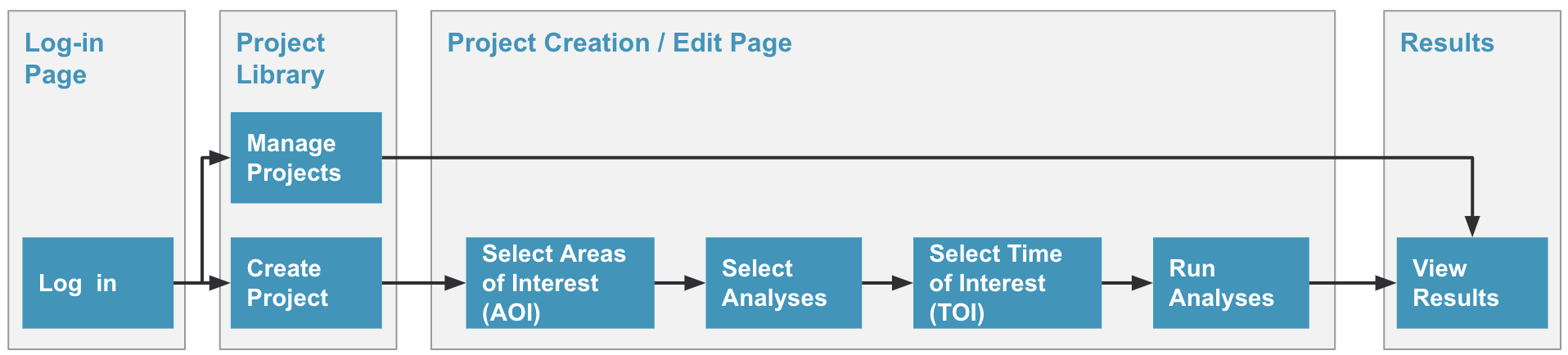
Every project in Elements follows a simple three-step workflow:
- Select Analysis/es - Choose what you want to discover
- Select Areas of Interest (AOI) - Define where you want to analyze
- Select Times of Interest (TOI) - Define when to analyze
User Journey Map
Next Steps
Updated 9 months ago
Did this page help you?