
Analyses
Multi-algorithm workflows for sophisticated geospatial analysis
Analyses
Analyses are workflows that combine multiple algorithms into powerful, multi-step geospatial analyses. Analyses are what you run from the Elements Application.
An Analysis defines “What” a user wants to discover. Analyses consist of one or more Algorithms joined together via a directed acyclic graph (DAG). As an example, Traceability is an Analysis that consists of four algorithms arranged like this:

Key Characteristics
- Multi-algorithm workflows consisting of one or more algorithms connected via a Directed Acyclic Graph (DAG)
- Complex capabilities enabling sophisticated multi-step geospatial analyses
- Connected processing where the output of one algorithm becomes the input to the next
- Flexible execution supporting branching and parallel execution paths
- Versioned for consistency and reproducibility
Analysis Flow
1. Input Data (filtered by AOI + TOI)
         ↓
2. First Algorithm processes
         ↓
3. First Algorithm results become input
         ↓
4. Second Algorithm processes
         ↓
5. Continue through DAG
         ↓
6. Final results stored and available
Directed Acyclic Graph (DAG)
Analyses use a DAG structure to define workflows:
- Directed: Data flows in a specific direction from one algorithm to the next
- Acyclic: No circular dependencies - the workflow always moves forward
- Graph: Multiple paths and branches are supported
This structure enables:
- Sequential processing chains
- Parallel algorithm execution
- Conditional branching
- Complex multi-step workflows
Versioning
An Algorithm can have one or more versions as shown in the following diagram:
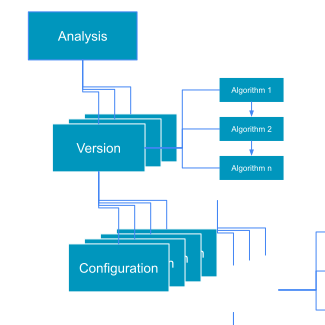
Once a version is registered it is immutable. This ensures:
- Consistency: Results generated by an Algorithm for the same input data don't change over time
- Reproducibility: Users can compare results across different time periods with confidence
- Flexibility: Multiple versions of the same Algorithm can be active simultaneously
- Control: Users specify which version their Analysis should use
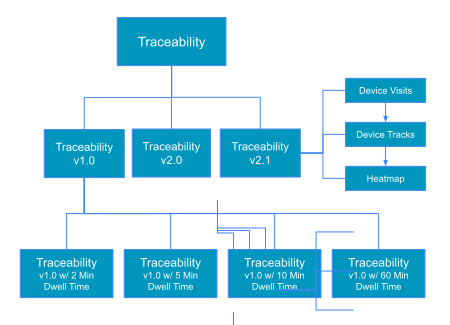
Elements can maintain multiple versions of the same Algorithm. Computations are tied to specific Algorithm versions.
For example, this is an example of how a Foot Traffic Algorithm could evolve over time:
Next Steps
- Understand the building blocks: Algorithms
- Define geographic regions with AOIs
- Set temporal parameters using TOIs
- Execute analyses through Computations
Updated 9 months ago