
Computations
The unit of work that combines algorithms, locations, and time periods
Computations
Computations are the unit of work in the Elements Platform - they represent the actual execution of algorithms or analyses with specific configurations, locations, and time periods.
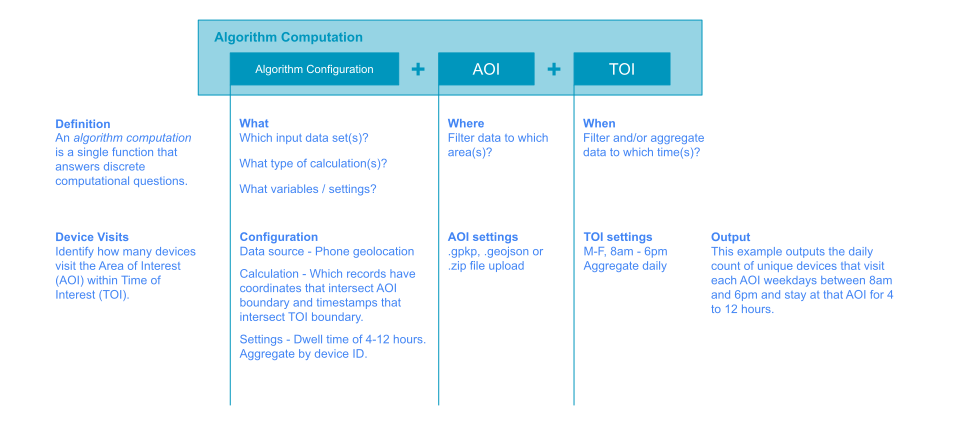
A computation combines:
- An Algorithm or Analysis configuration
- A collection of Areas of Interest (AOIs)
- A Times of Interest (TOI)
This creates an executable unit that processes specific data to generate results.
Computation Types
Algorithm Computation
Executes a single algorithm:
Algorithm Config + AOI Collection + TOI = Algorithm ComputationExample: Run vehicle detection on 10 store locations for the past 30 days.
Analysis Computation
Executes a multi-algorithm workflow:
Analysis Config + AOI Collection + TOI = Analysis ComputationExample: Run a 4-algorithm supply chain analysis on shipping routes for Q1 2024.
Computation Lifecycle
1. Creation
- Define the algorithm/analysis configuration
- Select AOI collection
- Specify TOI
- Submit for execution
2. Queuing
- Computation enters the processing queue
- Platform allocates resources
- Dependencies are resolved (for analyses)
3. Running
- Data is filtered by AOI and TOI
- Algorithm containers are launched
- Processing occurs in parallel (when possible)
- Progress is tracked and reported
4. Completion
- Results are validated and stored
- Status updated to complete
- Results become available via API or UI
5. Results Access
- View in Elements Application
- Download via Elements API
- Use as input to subsequent analyses
Computation States
Computations progress through various states:
- Pending: Waiting to start
- Running: Currently processing
- Paused: Temporarily stopped (can be resumed)
- Completed: Successfully finished
- Failed: Encountered an error
- Cancelled: Manually stopped by user
Computation Operations
Run
Start a new computation or resume a paused one:
- Immediate execution or scheduled for later
- Automatic retry on transient failures
- Progress tracking available
Pause
Temporarily stop a running computation:
- Preserves current progress
- Can be resumed later
- Useful for resource management
Resume
Continue a paused computation:
- Picks up where it left off
- No data reprocessing
- Maintains result consistency
Cancel
Stop a computation permanently:
- Cannot be resumed
- Partial results may be available
- Resources are released
Delete
Remove a computation and its results:
- Frees storage space
- Cannot be undone
- Use with caution
Parallelization
Computations leverage parallel processing for efficiency:
By Location (AOI)
Each AOI in the collection can be processed independently:
10 AOIs → 10 parallel processing unitsBy Time (TOI)
Each time period can be processed independently:
30 days → 30 parallel processing unitsCombined
Location and time parallelization multiply:
10 AOIs × 30 days = 300 parallel processing unitsResult: Dramatically faster completion times for large-scale analyses.
Data Flow in Computations
Algorithm Computation Flow
1. Computation starts
         ↓
2. Platform filters input data by AOI + TOI
         ↓
3. Filtered data divided by AOI and time period
         ↓
4. Algorithm containers launched for each unit
         ↓
5. Containers process data in parallel
         ↓
6. Results written to storage
         ↓
7. Computation marked complete
Analysis Computation Flow
1. Analysis Computation starts
         ↓
2. First algorithm in DAG executes (as above)
         ↓
3. First algorithm results become input to next
         ↓
4. Second algorithm executes using previous results
         ↓
5. Continue through all algorithms in DAG
         ↓
6. Final results stored
         ↓
7. Computation marked complete
Computation History
The platform maintains a history of all computations:
- Audit trail: Who ran what, when
- Reproducibility: Re-run with exact same parameters
- Comparison: Compare results across runs
- Debugging: Investigate failures or unexpected results
Resource Management
Computations consume platform resources:
CPU and Memory
- Specified per algorithm
- Determines container size
- Affects processing speed
GPU (Optional)
- For ML/AI algorithms
- Accelerates certain operations
- Higher cost but faster processing
Storage
- Results occupy storage space
- Larger AOIs/longer TOIs = more storage
- Cleanup old results to free space
Monitoring and Troubleshooting
Progress Tracking
- Real-time status updates
- Percentage complete
- Estimated time remaining
- Failed units identified
Logs and Diagnostics
- Container logs available
- Error messages captured
- Debugging information preserved
Performance Metrics
- Processing time per unit
- Resource utilization
- Throughput statistics
Best Practices
Computation Sizing
- Start small: Test with limited AOIs/TOI first
- Scale gradually: Increase scope after validation
- Monitor costs: Larger computations = higher costs
Resource Optimization
- Use appropriate cadence: Don't over-sample temporally
- Right-size AOIs: Balance coverage and processing time
- Clean up: Delete old computations when no longer needed
Error Handling
- Check logs: Understand failures before retrying
- Validate inputs: Ensure data exists for AOI/TOI
- Retry wisely: Transient failures may resolve, but systematic errors won't
Use Cases
One-Time Analysis
- Run a computation once for a specific question
- Generate a report or dataset
- Archive or delete when complete
Recurring Analysis
- Schedule regular computations (daily, weekly, etc.)
- Monitor ongoing conditions
- Track trends over time
Comparative Analysis
- Run multiple computations with different parameters
- Compare algorithm versions
- Test different configurations
Development and Testing
- Test algorithm changes
- Validate new analysis workflows
- Debug processing issues
Next Steps
- Understand what computations execute: Algorithms and Analyses
- Define where they run: AOIs
- Specify when they run: TOIs
Updated 9 months ago